


I’m finally back with a longer format blog about dual (stale) devices in Entra ID! As I’m usually very busy over the summer months and Q4, I hope to bring you more content over the winter. Enjoy.
I know the title is a mouthful, but if you’ve worked with Autopilot (AP) in any capacity, you’ve probably already encountered this “issue”. You deploy devices using AP, and at some point during their lifecycle – perhaps during troubleshooting – you realize that something is off. The Autopilot object doesn’t point to the correct Entra object, yet the Intune object does. What’s going on?
Bring me to the relevant script!
Essential knowledge
First things first. This issue is true for hybrid and (sometimes) for Entra only joined devices. I’m using the Entra joined imagery here for readability and because I strongly believe that hybrid joined devices are usually more prone to have this issue – or rather its expected at this point. You can use the script for both cases!
There are three linked objects: The AP object, the Entra object, and the Intune object. This can be confusing since many people don’t realize that the AP object is its own entity. You might have seen the “Sync” button on the AP device page, but where does it sync to? In the past, it was the Store for Business; today, it’s the ZTD (Zero Touch Deployment) DDS (Device Deployment Service) hence: ztd.dds.microsoft.com. But, to be fair, those names are just a guess. It’s a global service that identifies your device. Hopefully, you’ve considered what I wrote in the other blog post about network requirements.
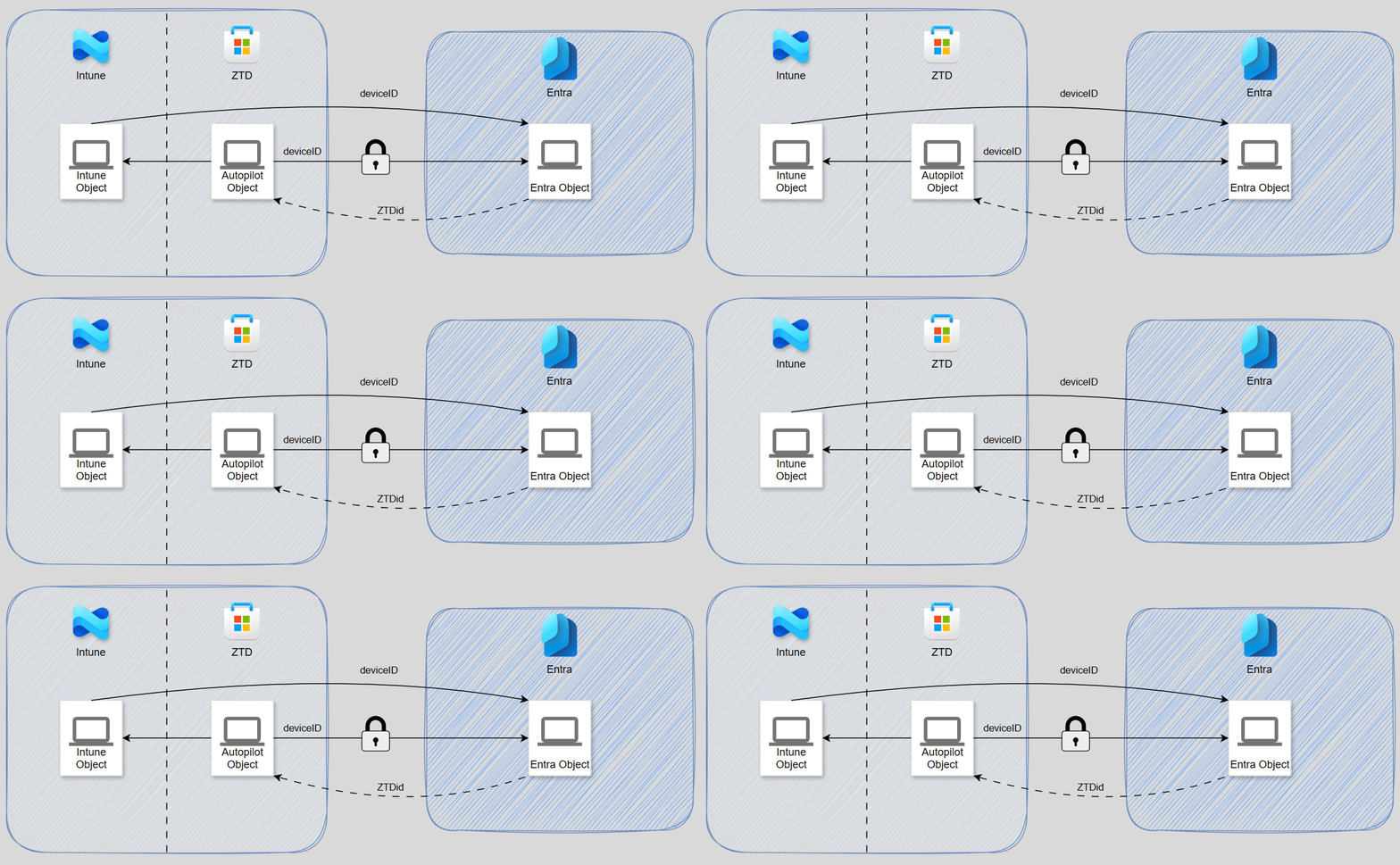
As you can see above, a healthy relationship between all three objects typically begins this way. The AP object is created through one of many possible methods. Then, the ZTD creates a linked Entra object in the tenant, which is disabled by default the device runs through a join process. At this point, deleting the Entra object is impossible (at least through the GUI). Intune creates an object during device enrollment.
The breakup
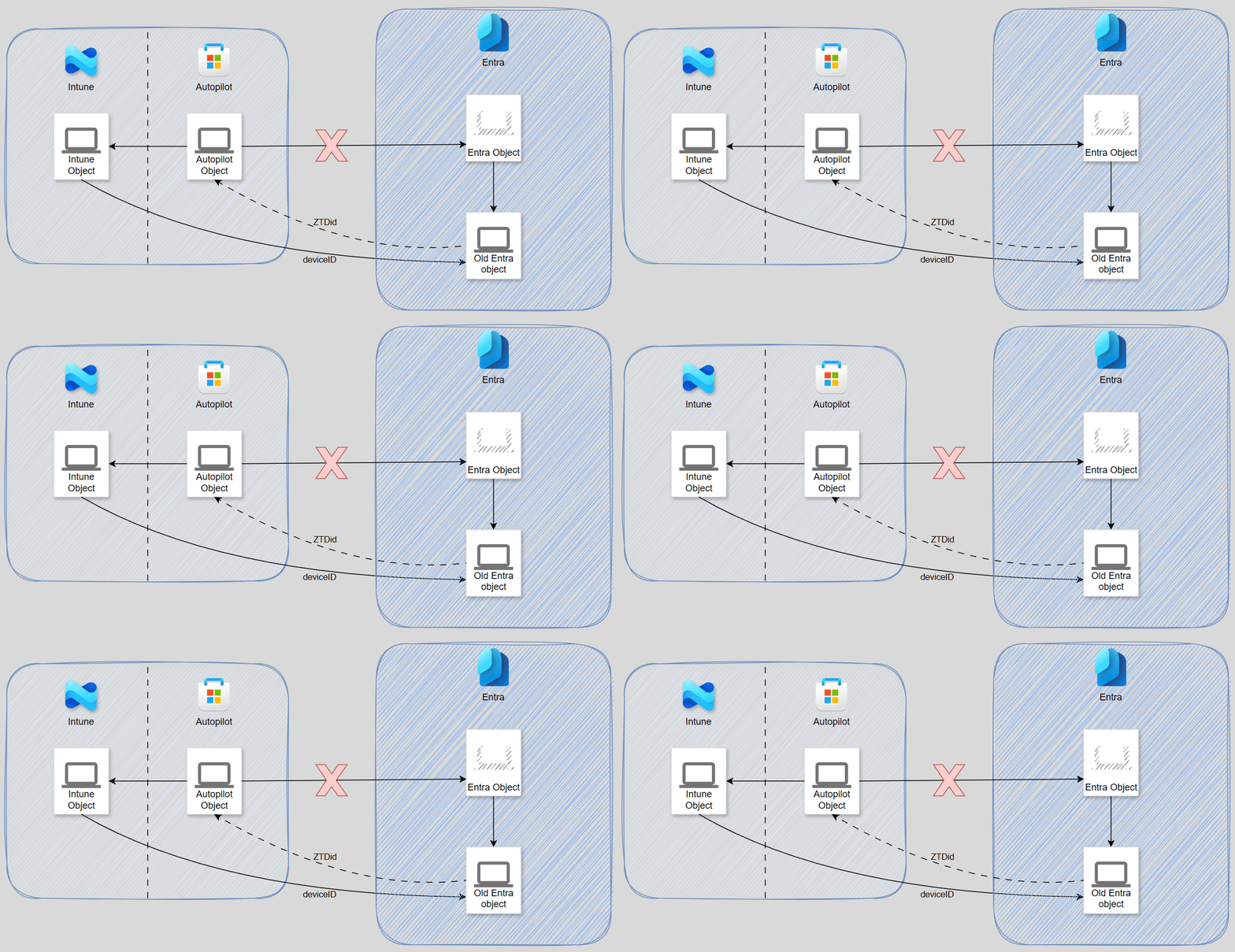
Unfortunately, I haven’t determined the exact cause of the issue and for hybrid this seems to be the norm – that wasn’t always the case. I thought it only occurred when devices were renamed during Autopilot, when using hybrid join (most common). However, I have observed environments with cloud-native devices that experience this issue after being manually rejoined to Entra (uncommon). The only thing I’m certain about is that this seems to be a somewhat common issue that occurs when Entra doesn’t handle a device change properly. Since this process is very much a black box and I couldn’t find any evidence on affected devices I can’t dig further into the cause.
The outcome is always the same regardless: The connection between the AP object and the Entra object is severed from the Autopilot’s perspective. At the same time, though, the Entra object is not deleted and retains its name and pointer to the AP object. This means you can’t delete it through the GUI, too. The device is still active with an Intune enrollment. And the worst thing is, that this can happen multiple times (record currently: 6 devices).
Cleanup
You need to ask yourself first: Do you need to clean this up? While it doesn’t look pretty and might cause a bunch of extra stale Entra devices, it doesn’t stop the correct, active, in-use device from working properly. At least there is no obvious downside apart from keeping the house a bit more unclean.
While I don’t have an “100%-its-this-guarantee” answer regarding the cause and thus avoiding this altogether, I can tell you how to clean this up and it is not pretty. Let’s look at the ideas that spring to mind first:
- Merge the Entra objects somehow.
- Correct the Autopilot object to point at the correct Entra object.
- At least remove the Autopilot pointer from the original Entra object.
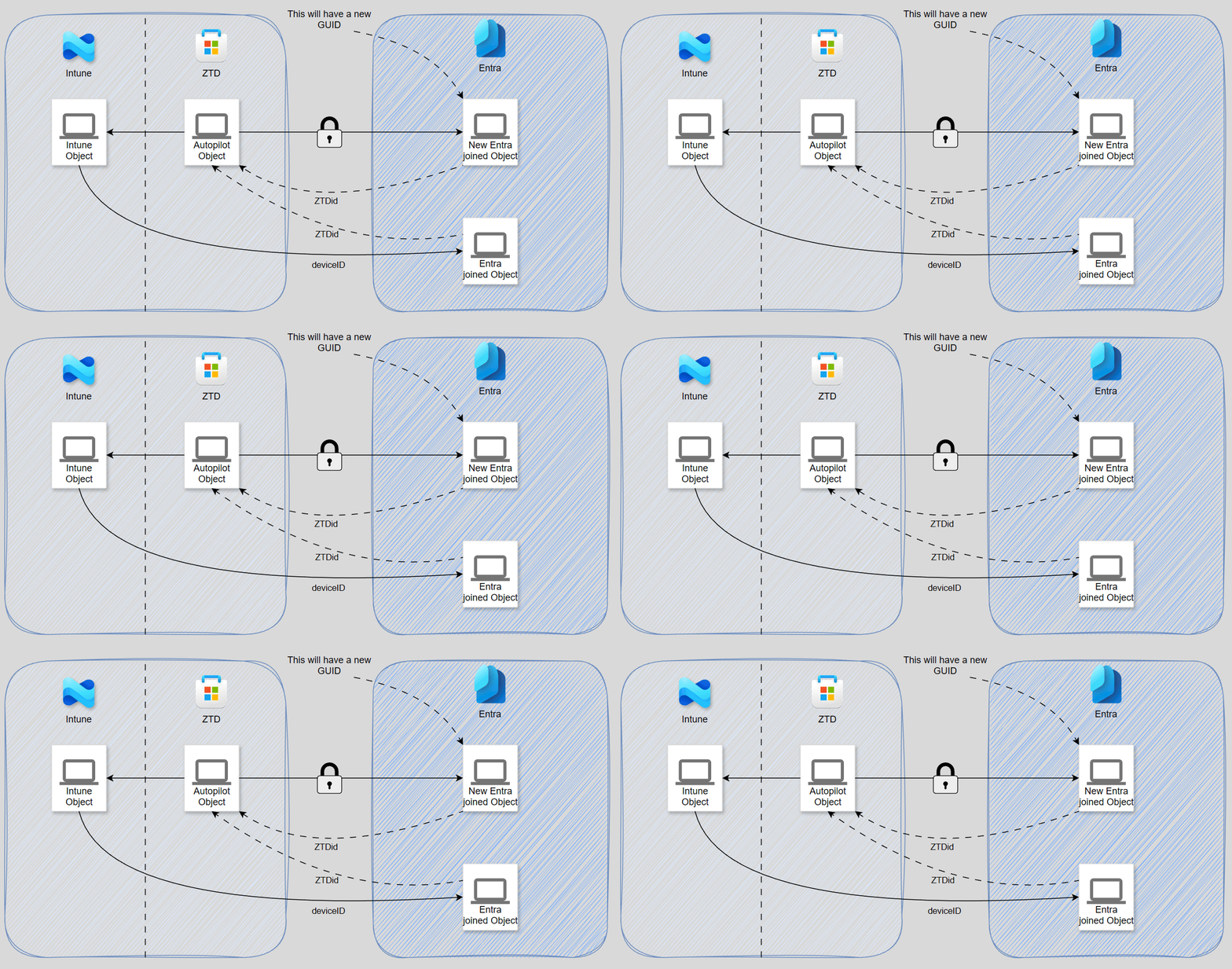
Well, here’s the bad news: None of this is possible. All Autopilot pointers are read-only attributes, so cleanup that (tries) using these isn’t possible. The only way to clean this up is a break-fix scenario, where the Autopilot object is deleted first. This will cause the reference from the original Entra object to be automatically cleaned up. Reimporting the AP device will also recreate the Entra object, but at least all pointers are correct again.
To identify the devices, I provide a script (see top of this blog post). However, I do need to explain the logic a bit in a separate blog though, as this one is already quite long.
Finishing thoughts
I’ve only ever seen Microsoft recognized this “dual state” issue is in the Autopatch documentation. However, this is a slightly different situation (with it talking about registered and then later Hybrid-Joined devices). In that article they recommend a “stale device cleanup”. Most environments do not dare to touch devices automatically using their own tooling/script. Some other customers just go “that’s not my department, that’s identity”. In my next post I really hope I can remediate those worries and bring you a solution that everyone can run worry-free. Until very soon!