


I kept putting off writing this blog post, but I finally decided it was time. I’m going to try to pour all the knowledge I’ve accumulated over the last three years into this one post. You’re probably here because you’ve heard that there’s more to do in 2026 than just upgrade to Windows 11. It won’t be easy, but I hope you’ll learn something and choose the right course of action for you.
Another Ask Microsoft Anything on Secure Boot is coming up on February 5th 2026! Read the blog and ask questions I might have missed!
Updates since initial release
- 05.02.2026: Added UEFI key recovery scenario to FAQ.
- 18.02.2026: Added Omnissa community info and new FAQ entry “What happens if I don’t update the Secure Boot certificate?”
Background knowledge
Skip this part if you’re only interested in required actions and pitfalls! Also note that I stuck to the official UEFI notation for the database names which are all lower case compared to Microsofts writing that uses upper case. They describe the same.
In January 2023, three years ago, Microsoft attended the “UEFI Fall 2023 Developers Conference & Plugfest” and presented this highly underrated talk. Along with it came a presentation that explains what is happening and why action might be required. To keep the quality up, I took the liberty to quickly redo the most important bits and enhance them throughout this post.
Please accept YouTube cookies to play this video. By accepting you will be accessing content from YouTube, a service provided by an external third party.
If you accept this notice, your choice will be saved and the page will refresh.
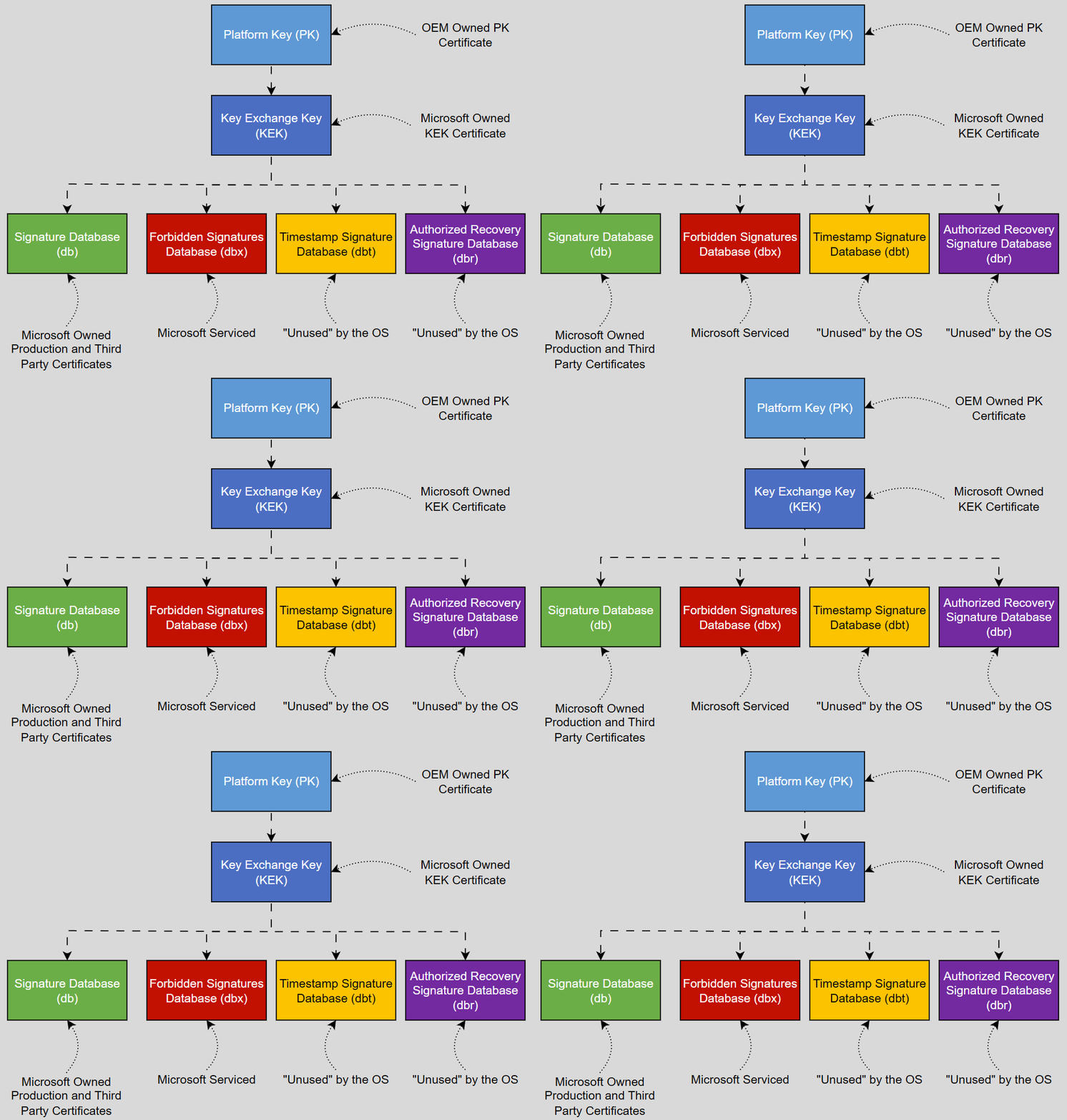
This leaves us with a couple of terms we need to know to understand what exactly is happening. For a deeper explanation I recommend reading the Microsoft guidance and/or James Bottomley’s “The meaning of all the UEFI Keys” [11.2012, last verified 02.2026], which I will both lean on for further explanation.
| Handle | Full Name | Meaning |
|---|---|---|
| db | Signature Database | Contains the accepted keys, signatures or hashes. All bootloaders signed by these certificates will be accepted by Secure Boot. |
| dbx | Forbidden Signatures Database | Contains explicitly forbidden keys, signatures or hashes.. All bootloaders signed by these certificates will be refused by Secure Boot. |
| dbt | Timestamp Signature Database | This is not used at runtime but is provided in order to allow the OS to recover the OEM’s default key setup. |
| dbr | Recovery Signature Database | The OEM’s default OS Recovery signature store. |
| KEK | Key Exchange Key | Public keys to be trusted to communicate with the platform firmware. This will usually contain certificates from Microsoft and the OEM and other vendors. |
| PK | Platform Key | The public part of the OEMs platform key. This is always singular. |
The PK is the root of trust, meaning that every somewhat modern mainboard has one pre-installed for use with secure boot. This key is used to sign the KEK. The KEK, in turn, is used to sign certificates in the db/dbx. This is the problem that Microsoft is facing: unless the OEM that owns the private part of the PK required to sign the KEK, the db/dbx certificates cannot be updated permanently; they will only be appended (same for the KEK). If the platform is reset to the default keys changes to the db/dbx might be reset. More on that later.

Lastly, OEMs grant different levels of access to this process. Some OEMs allow you to swap the PK for something different. These different levels of access are described by “modes,” which may have different names depending on the OEM.
| Mode | Meaning |
|---|---|
| Setup Mode | This allows for the installation of new PK and KEK. This is sometimes also called “custom.” Switching to this mode typically installs the OEM’s default PK. |
| User Mode | After installing a PK, the UEFI will switch to this mode. All certificates in the KEK database must now be signed by the PK. This should be your default setting when checking the UEFI. |
| Disabled | Secure Boot is off. |
History and “Ye olde way” and BlackLotus
Since at least May 2023, when CVE-2023-24932, also known as BlackLotus, was released Microsoft has been aware of the Secure Boot certificate expiry and has released blogs on how to update the certificates. Or rather, Microsoft’s focus shifted when they realized that the certificate change was only three years away. A companion KB was released for this specific CVE, which, along with the Windows Update, had to be followed to enable the remediation. See KB5025885 for more information. Many articles and scripts have been released since that explain how to remediate or automate BlackLotus away. However, the remediation achieves almost the same as the Secure Boot certificate update, albeit more complex, requiring multiple reboots to work.
Unfortunately it is not made very clear from the initial KB since it hasn’t been updated in a long time. I will not focus on any of those old~ish articles, since that method has been updated, hence “Ye olde way” is used here very mockingly. However, you might be able to leverage some of the functionality of those keys, depending on where you are on your journey. I will reference this where applicable later on.
What happens when the certificates run out?
Microsoft provides the following table showing when certificates expire. The Microsoft Windows Production PCA 2011 is the certificate that signs (or rather signed) the Windows bootloader. However, Secure Boot isn’t picky about time. The reason the certificates are set up as explained earlier is to ensure that only boot loaders signed by these certificates are allowed to boot. Note that Secure Boot does not rely on timestamps or verify CRLs during boot. This means that, as long as the boot loader’s signature doesn’t change, your Windows will happily keep booting even if the certificates up the chain expire. The db entries explained in the first chapter are an “allow list“.
So, what’s the issue? Why are we discussing this? The first and most important step is to put the Windows UEFI CA 2023 on the allow list in the Secure Boot db. To further secure the boot process and prevent booting from outdated or altered boot loaders (see BlackLotus above), the next critical steps are to add the Microsoft Windows Production PCA 2011 to the dbx, which means explicitly disallowing it and lastly updating the PK.
| Expiring Certificate | Expiration date | New Certificate | Storing location | Purpose | Personal Note |
|---|---|---|---|---|---|
| Microsoft Corporation KEK CA 2011 | June 2026 | Microsoft Corporation KEK 2K CA 2023 | Stored in KEK | Signs updates to db and dbx. | Only updateable by the OEM |
| Microsoft Windows Production PCA 2011 | Oct 2026 | Windows UEFI CA 2023 | Stored in db | Used for signing the Windows boot loader. | Future bootloaders will not be signed by this! |
| Microsoft UEFI CA 2011* | June 2026 | Microsoft UEFI CA 2023 | Stored in db | Signs third-party boot loaders and EFI applications. | Your GPU, NIC, RAID etc. is signed by this! |
| Microsoft UEFI CA 2011* | June 2026 | Microsoft Option ROM UEFI CA 2023 | Stored in db | Signs third-party option ROMs | This was used to sign Linux boot loaders for example. |
Required actions and remediations
First of all, here’s an overview of what you need to do now, based on this very handy short link https://aka.ms/GetSecureBoot. Some of these steps can brick a perfectly functioning Windows – at least temporarily – or even your UEFI. Its very unlikely, but it can happen. You should not skip any of the steps outlined here. Make sure you have access to the BitLocker keys for your test devices. Also, make sure you have the LAPS password or equivalent access. Read the FAQ at the end of this article.
- Create a representative collection of the hardware in your environment to test with. This should cover most of your estate. If your hardware is not homogeneous, select a percentage of your in-use devices that is representative. If you have them, make sure to include Windows 10 devices. All the devices need to be on at least October (for Windows 10) and November (Windows 11) updates.
- Set up your monitoring, you will need to look at event logs. The linked article will show you which event logs you need to collect. There’s a variety of tools to use for this, pick your favorite. Currently, there is no report in Intune, but I would keep a look at a service release for Autopatch in the near future…
- Enable the settings in your subset of devices using one of the methods described in Microsofts article. If you have to rely on in-use devices, make sure the users are aware of what can happen and where they can report to. The settings can be deployed in multiple ways. I recommend to configure all three options available.
- Review the results of your tests and form a plan for each model/UEFI version where to go to next.
My explanation here is brief, but there are already great blogs explaining those steps in detail. I think the Microsoft article does a good job, too. While the settings can be activated through any means, it should be noted that some of BlackLotus’s CVE steps can be used to take slower steps.
Keep in mind that BlackLotus’s steps will put the old certificate in the dbx as last step, whereas the SecureBoot remediations don’t do this last step (yet).
Using BlackLotus CVE-2023-24932 remediations
As mentioned earlier, the steps in the remediation from the CVE are very similar to what the Secure Boot Update does. Important note before you use this: This will allow you to just update the db or dbx. It will not try to replace the KEK as that wasn’t required to fix the CVE! Use this method only if you want to carefully look at each step one by one! There are two articles, one being the aforementioned KB5025885 the other is the much lesser known KB5053946. I will not repeat what is said in those articles, however here’s a summary of when to use which KB.
- KB5025885 – Very slow approach, that requires multiple reboots providing multiple events per reboot to troubleshoot.
- KB5053946 – More recent, less reboots, still lots of information, but in a slightly more organized way.
FAQ
It should be mentioned that Microsoft also has an FAQ and I will try not to repeat what is explained there. It can be safely assumed that these will be updated as time goes on. Many questions were also answered in the December 2025 “Ask Microsoft Anything: Secure Boot” below.
Please accept YouTube cookies to play this video. By accepting you will be accessing content from YouTube, a service provided by an external third party.
If you accept this notice, your choice will be saved and the page will refresh.
What happens if I don’t update the Secure Boot certificate?
At some point after June 2026, Microsoft will stop trusting old certificates from 2011. This means that the Microsoft will no longer use the 2011 KEK, Production, and UEFI CA. Most existing devices will continue to function as they are. However, consider the following:
- If the new KEK 2023 isn’t in place, automatic updates to the dbx won’t be possible anymore. Remember, this key must sign all entries in the db and dbx.
- You will remain vulnerable to the aforementioned CVEs. This is because, if Microsoft cannot guarantee that the certificate in the db and KEK is in place, they will not put the old boot signature into the dbx. That’s my opinion, at least.
- You’re stuck with the latest 2011 signed Windows boot manager after October 2026. Microsoft certainly won’t sign a new boot manager with an expired certificate. This could result in security vulnerabilities that cannot be fixed.
- This mainly applies to desktop devices, but the same goes for other UEFI applications signed by the old certificate (see the above table). Devices may be signed with the new 2023 certificate, in which case Secure Boot will reject them if the KEK is missing. Think GPUs, especially, but we won’t get any from Nvidia this year anyway…
What can break if I update my Secure Boot certificate?
- Your current OS might stop booting, if the current boot loaders signature certificate is not in the db. This might happen if the Windows you’re trying to boot is using the new boot loader signed with the new signature certificate. Yes, this applies to PXE as well.
- Your current OS might stop booting, if the current boot loaders signature certificate is on the dbx
- Secure Boot might stop working altogether, if it can’t handle new entries on the db due to size constraints.
- BitLocker might trip and request the recovery key.
- WinPE might not boot (regardless of if PXE or USB was used) for the same reason as the first two bullet points.
- You might brick your device if you don’t update the UEFI/BIOS first. Even Microsoft mentioned this already two years ago in their presentation. I did get first reports of this happening, so do plan around it. A member on the WinAdmins Discord send me a video – check it out to see what that can look like (Thanks for providing this! You know who you are!).

What happens if I or something else resets the secure boot keys
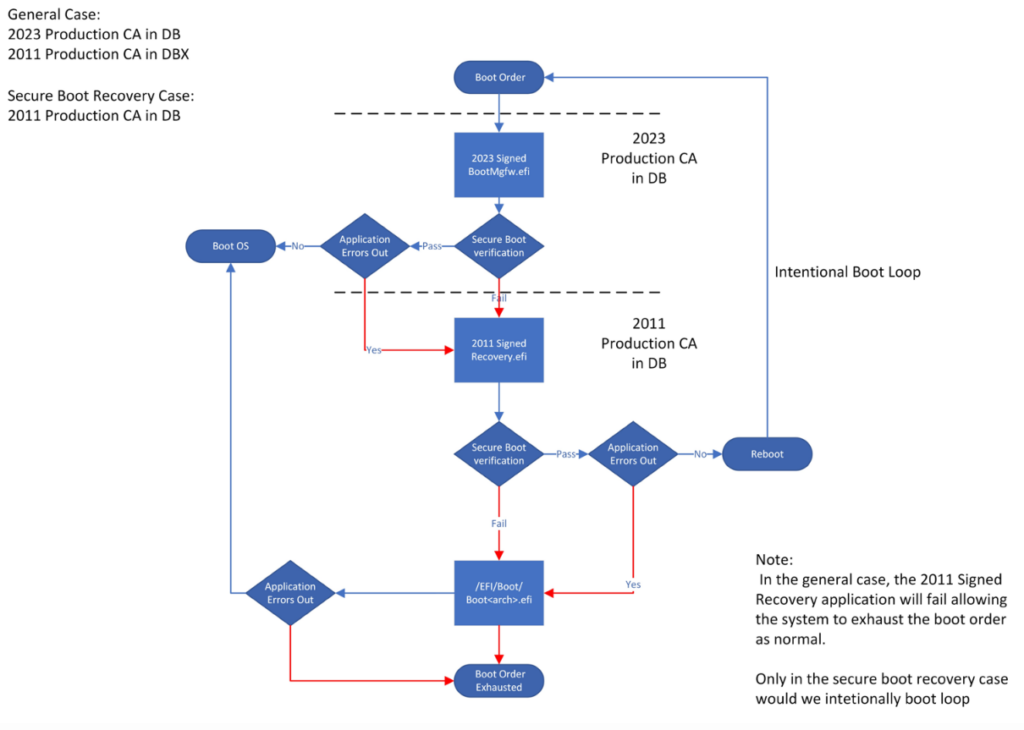
As explained in the beginning, the PK needs to sign the KEK to trust it. If you don’t have an updated PK and reset the secure boot keys to firmware default all changes will be lost. However the machine is recoverable from something called “Securebootrecovery.efi”. All you need is to prepare a flash drive with that file on it. It’s located in C:\Windows\Boot\EFI\SecureBootRecovery.efi if your device has at least the July 2025 LCU. Yes, this will keep working since boot loader is signed with the old 2011 certificate. This information is taken from the BlackLotus CVE KB mentioned above.
Make sure to read the Known Issues section before you attempt the following.
- Reformat your flash drive to FAT32 using the default settings. This is optional in most cases, since most UEFI can manage NTFS as well.
- Create the following folder on your flash drive, where D: is to be replaced with your drive letter
D:\efi\boot\ - Copy the Securebootrecovery.efi into that folder
- Rename the file to
bootx64.efi - Boot to that flash drive to re-insert the keys into the DB. The device should reboot and then boot into OS normally (see picture below, this is what they mean by “2011 signed recovery application”
Why and when do I need a UEFI update?
UEFI, which is often still referred to as BIOS, requires updates for various components on the mainboard. You should do these updates regardless of this issue regularly, since they also often fix other security vulnerabilities. In general you don’t strictly require an update, but this might lead to issues including bricking devices (see last FAQ item). However, regarding Secure Boot, consider the following:
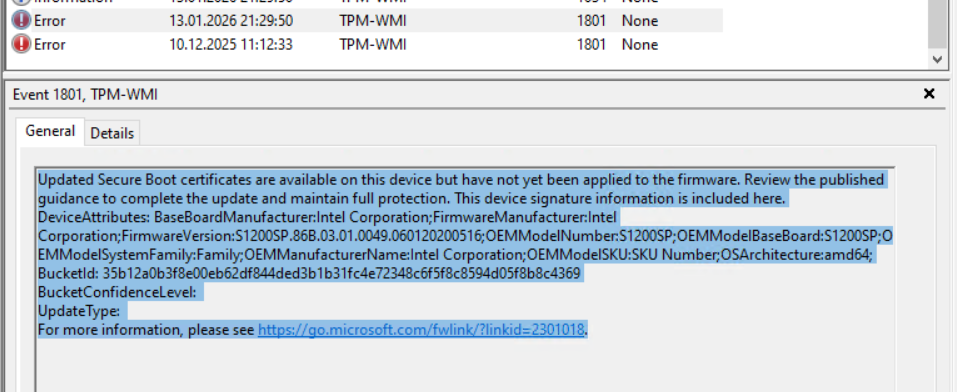
- Microsoft provides Event ID 1801 in the System log (Source TPM-WMI) will inform you if the certificates couldn’t be updated and provide some more information about the current UEFI version (see below). Many, even if the devices are older should have an available update. The event (also shown below) shows a lot of information about your UEFI too so make sure to use it when evaluating.
- Updating the Platform Key that signs the KEK (see first chapter) requires a UEFI/BIOS update.
- Update of the db/dbx structure – this is the case, when the database was designed too small to handle more than the entries already on it. Please make sure that you read the instructions of your OEM carefully as these updates usually don’t allow rollback (“base version”). This may be described as “BIOS binary regions have surpassed their original design sizes” (see Intel® Server Board S1200SP BIOS and Firmware Update Package for EFI for example). It is unclear if updates like this increase the available space to handle both, the old and the new certificate.
- Make the updates to db/dbx future proof – if the new KEK Microsoft Corporation KEK 2K CA 2023 isn’t in your KEK store, that means your PK doesn’t trust this one yet. That means, that your current OS could write the changes to the db/dbx using the current, trusted KEK. However, the PK needs to be updated to trust that new KEK 2K CA 2023 which I can only assume will be used in the future. A PK update should not reset the current db/dbx or KEK entries if the OEM followed Microsofts guideline on this which reads “If doing a firmware update to update the PK, care should be taken to ensure the KEK, db, and dbx are preserved.”. However, Microsoft points this issue out in their own FAQ (see Customer/IT Managed Systems Secure Boot FAQ Q7 ‘My device stopped booting after[…]’)
- Additionally to the last point: If you have a SoC updating the PK depends very much on how well the OEM is organized. The secure firmware update key is permanently burnt into those devices and as long as the OEM still has access to that key they can use it to update the PK.
Can I still boot into WinRE? | Do I need to change WinRE? | Why can I still boot into WinRE?
WinRE (not WinPE!) is located in your recovery partition and can be updated. This kind of update is recommended for BlackLotus and other related CVEs. However, WinRE is booted using chain loading and will still function as long as the first boot loader is allowed by Secure Boot. The same applies to booting from a CD/ISO, since the WinRE boot loader only boots after the initial boot loader with the new signature has loaded. The boot sequence is as follows (abbreviated):
- Check the db entries against the PK.
- “If the firmware is not trusted, the UEFI firmware must initiate OEM-specific recovery to restore trusted firmware.”
- The Windows Boot Manager will attempt to load. If it fails, it will try to boot from a copy. If that fails, it will load OEM-specific remediation.
- If Windows fails to load, boot to WinRE.
- ELAM will be loaded.
- Kernel drivers and user-mode processes are loaded
How do I get the exact certificate information from my UEFI/BIOS databases?
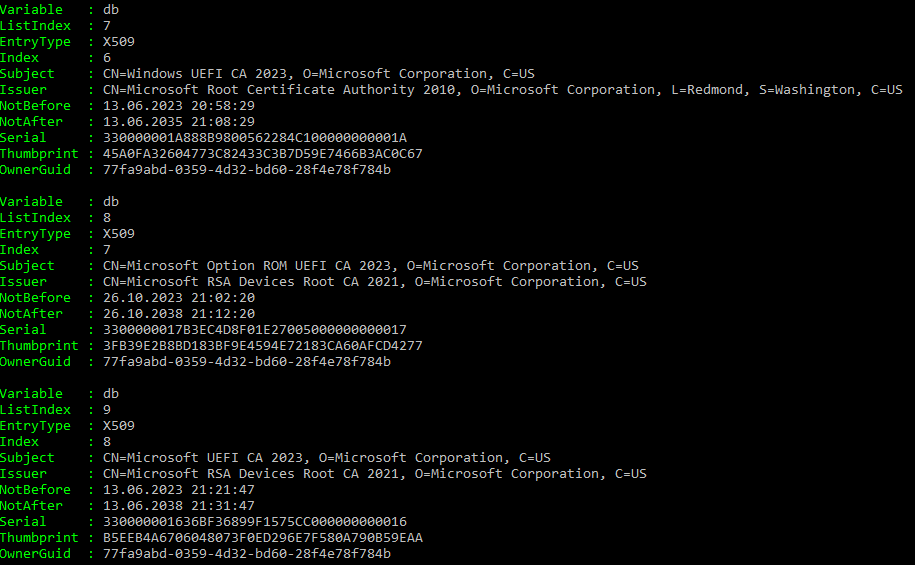
Trevor Jones has you covered – his script gives you readable, digestible results. I have 487 entries on my dbx (mostly hashes), including the Microsoft Windows Production PCA 2011. Using just the function Read-SecureBootDatabase from that script, will even deliver nice, human readable results shown below. If you feel the need to look at the full certificate, I direct you to Microsofts GitHub Repo for Secure Boot Objects.
Do I need to update my bootable media (USB or PXE)?
Yes. There are too many variables here to answer this one reliably. However, the boot manager of your bootable devices must match with your db/dbx entries. The first two points of “What can break if I update my Secure Boot certificate?” also apply here. Microsoft refers to KB5053484, however I didn’t have the need yet to use this, as Configuration Manager supports updating the boot loader out of the box since 2509.
Useful links
- Windows Secure Boot certificate expiration and CA updates – this is really the only article you should need for guidance from Microsoft. It is updated regularly!
- Microsofts GitHub Repo for Secure Boot Objects – contains the certificate files use for the KEK etc. Also contains the signed binaries from the respective vendor for the KEK (no, you can’t just apply these without also touching the PK, which requires a UEFI update)
- Please read your OEMs information about this carefully:
- Update 18.02.2026: Omnissa actually published a good article with a lot of scripts and steps on it.
Closing words
If you’ve made it this far, congratulations! I hope you’ve learned something. The real takeaway is that these updates seem “easy” at first glance. In reality, they are much more complex than I anticipated. For now, I don’t think anything significant will happen in most cases. The db/dbx will be updated using the current, PK approved KEK, and, unless the keys are reset to factory defaults for any reason, the new OS will boot just fine. Sure there are edge cases, where a UEFI update is required, but I doubt the percentage will notice before the EoL of that hardware. I will monitor the situation and update this article as needed. If you spot any errors, feel free to contact me using any of the provided social media links in the top right corner. Godspeed.